

The problem isn't that reviewers are difficult. It's that they're given a blank canvas. When a stakeholder opens a proof with no guidance on what to look for, they look for everything. You get a mix of brand-critical corrections, personal preferences, and questions that should have been answered in the brief — all arriving at the same time, with equal apparent weight.
That's the root cause of the endless revision cycle. If you've ever read why design reviews get stuck and how to break free, you'll recognise the pattern: unclear scope leads to open-ended feedback, which leads to another round, which leads to scope creep.
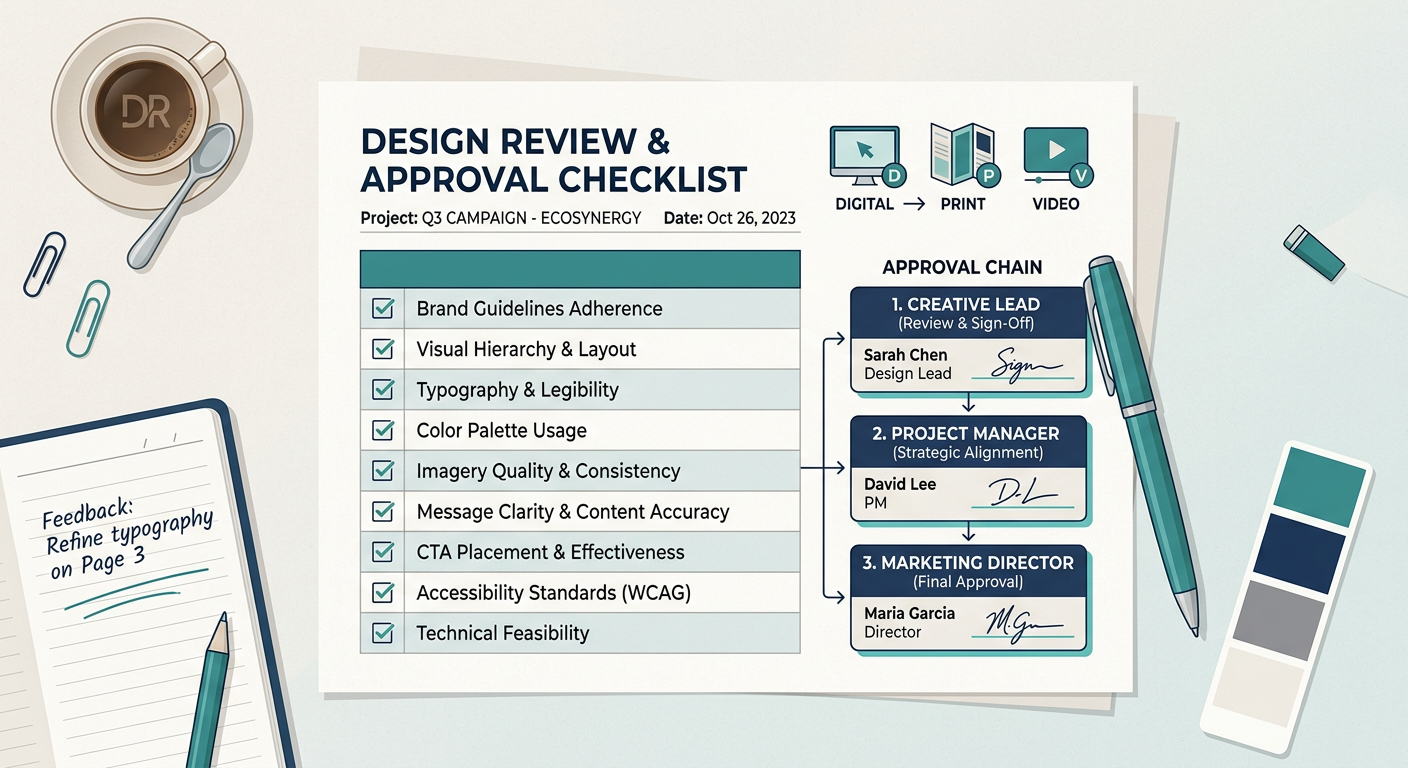
The fix isn't cultural; it's structural. A review template tells every participant — designer, reviewer, approver — exactly what the review covers, what's in scope, and what a completed approval actually means.
A review template is a structured document that travels with every proof. It doesn't replace conversation; it frames it. A solid template has four components.
1. Review scope A one-sentence statement of what this proof is for. "This is a first-draft layout review. We are checking structure and hierarchy only — final copy and colour have not been applied."
2. A role-based checklist Different reviewers are responsible for different things. A legal reviewer shouldn't be marking up kerning. A brand manager shouldn't be approving compliance copy. Separate the checklist by role so each person only sees what they own.
3. Feedback rules Specify how feedback should be given. "Corrections must be pinned to the relevant area of the proof. General comments go in the comments thread. Change requests must describe the problem, not prescribe the solution."
4. A single sign-off owner per stage Every stage needs one person who can say "approved". Not two. Not a committee. One. If that person is unavailable, the template names a deputy. This is the single biggest structural change most teams can make.
An approval workflow is the sequence of stages a proof moves through before it's signed off. The mistake most teams make is designing it for the easy projects. Pressure-test it against your hardest one first.
A reliable workflow has three characteristics.
Running legal and brand review simultaneously sounds efficient. In practice, legal approves a layout, brand then requests a structural change, and legal has to re-review. Sequential stages with a clear gate at each one take longer in theory but fewer total rounds in practice.
That said, for low-risk assets (social posts, internal documents), parallel review is fine. The template should specify which approach applies.
"Please review by Friday" is a due date. "Reviews not submitted by 17:00 Friday will be treated as approved" is a deadline. Teams often resist this, but a no-response rule is what prevents one absent stakeholder from holding up a launch.
Every round of review produces a new version. The template should make clear that annotations from round one do not carry forward automatically — the designer produces a revised proof, and reviewers confirm specific changes have been addressed. This is why version control in creative workflows deserves attention as a discipline in its own right, not just a side effect of good tooling.
The following checklists are starting points. Every team should adapt them to their own brand standards and regulatory environment.
For packaging specifically, a more detailed process is worth running alongside your standard checklist. Packaging errors are expensive to correct post-print — a structured packaging design workflow that runs from brief to production helps catch issues earlier than a standalone proof review will.
Video proofing has its own set of challenges that still-image reviews don't fully address. Understanding what video proofing involves is useful context before you finalise a video-specific checklist.
A template that's too prescriptive gets ignored. One that's too loose doesn't help. The balance is to lock the structure and leave the content flexible.
Lock these:
Leave flexible:
Storing your templates centrally — in a shared drive, a project management tool, or directly inside your proofing platform — means updates propagate automatically rather than existing in seventeen slightly different email attachments.
GoProof supports structured review workflows that can carry checklist logic and role assignments alongside the proof itself, which removes the manual step of attaching a separate document to every send.
Most "surprises" in creative projects aren't actually surprises. They're consequences of assumptions that were never written down. A new stakeholder joins partway through and re-opens settled decisions. A brief changes but the review checklist doesn't. A designer follows the old version of a template because the updated one wasn't communicated.
Process documentation closes these gaps. The review template is a piece of process documentation. It should be version-controlled (yes, the template itself needs versioning), reviewed at least quarterly, and owned by a specific person.
Teams that treat their review templates as living documents rather than one-off creations find their approval workflows become genuinely self-improving. Each project surfaces gaps; the template gets updated; the next project runs more smoothly.
GoProof's approach to online proofing is built around the idea that proofing tools should fit into an existing workflow rather than force a wholesale change. Review templates follow the same logic: build them around how your team already works, then tighten the structure incrementally.
Every design review template needs a defined scope, a role-based checklist, clear feedback rules, and a named sign-off owner for each stage. Without these four elements, reviewers default to checking everything subjectively, which produces conflicting feedback and extended revision cycles.
Most projects need two to three stages: a structural or concept review, a content and copy review, and a final pre-production sign-off. Adding more stages beyond three increases turnaround time without proportionate quality gains; fewer than two stages tends to miss the category of errors each stage is designed to catch.
Digital templates focus on platform specifications, link accuracy, and accessibility standards, while print templates prioritise file format, colour mode, bleed, and regulatory text. The approval workflow structure can remain the same across both; it's the checklist content that changes to reflect the technical requirements of each medium.
The project manager or creative operations lead is the most practical owner, because they see every project type and can spot gaps across the workflow. Ownership matters less than accountability: one named person should be responsible for updating the template, communicating changes, and enforcing its use.
A single workflow structure can work across project types, but the checklist content should be tailored to each one. The most efficient approach is a master template with a shared workflow section and swappable checklist modules for digital, print, video, and document projects.


