

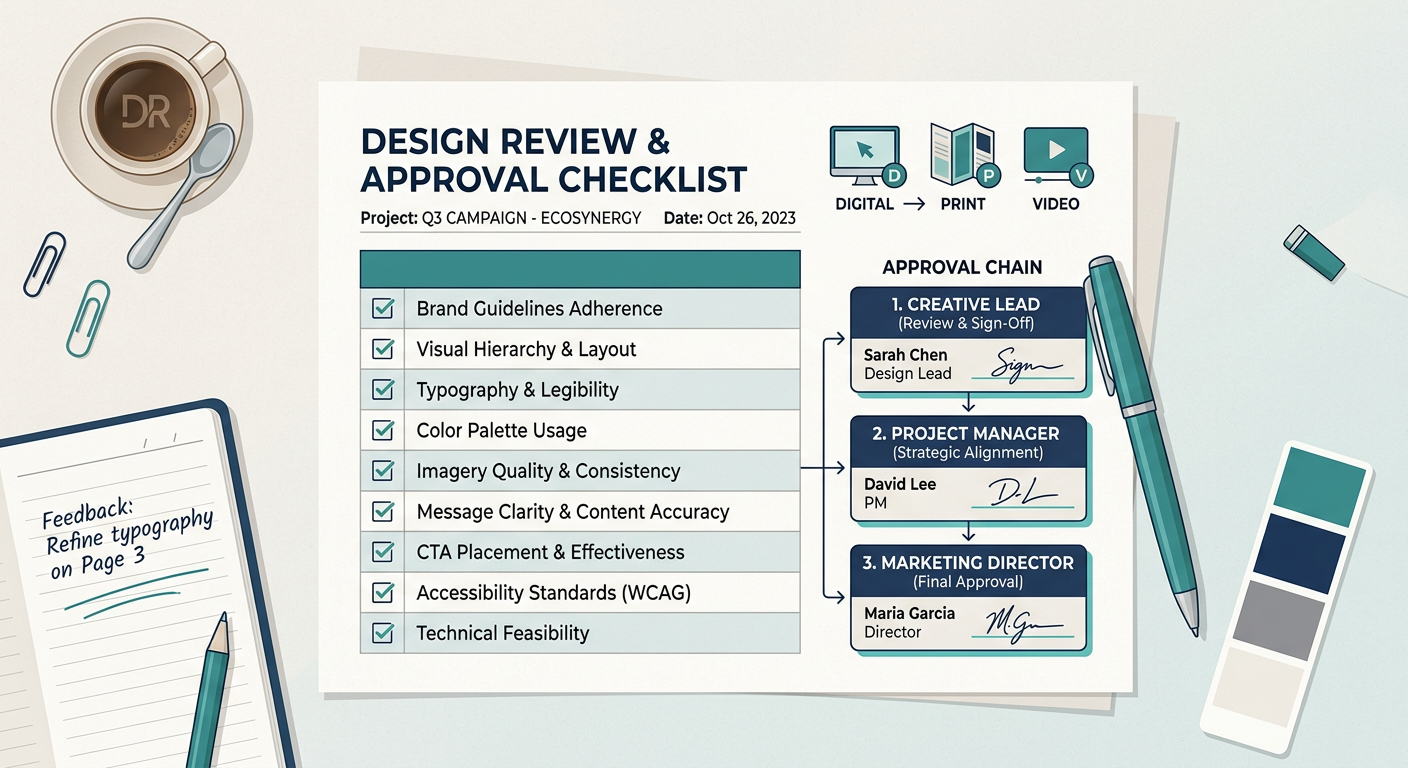
Unstructured design reviews are one of the most common sources of project delays in creative teams. Without a defined process, feedback arrives at different times from different people, covers different things, and often contradicts itself — forcing designers to make changes based on incomplete or conflicting information, only to repeat the cycle.
Research from the Project Management Institute suggests that poor process documentation contributes to around 40% of project failures. In creative workflows, that inefficiency tends to show up as excessive revision rounds, missed deadlines, and sign-off bottlenecks.
The fix is not more meetings or more chasing. It is a standardised review template — a documented framework that tells every stakeholder exactly what to look at, when to look at it, and how to communicate what they find.
A design review template is a reusable document that defines three things:
These three layers work together. A checklist without a clear approval chain means reviewers do not know whose feedback is binding. An approval chain without a checklist means reviewers do not know what they are actually being asked to evaluate. And both are useless if feedback arrives via five different channels with no structure.
GoProof is built around exactly this principle — that approval workflows need structure at every layer, not just at the point where someone clicks "approve".
Define your approval chain first, before anything else. The most common mistake teams make is writing a detailed checklist and then realising nobody knows whose feedback takes precedence when two reviewers disagree.
A workable approval chain has three tiers:
These are subject-matter contributors (copywriters, brand managers, legal, marketing) who check specific elements within their domain. Their feedback is advisory and should be submitted before the work reaches the next tier.
The creative lead consolidates Tier 1 feedback, resolves contradictions, and confirms that the work meets the brief before passing it upward. This role is the traffic controller for the review cycle.
A single named individual (typically a creative director, project owner, or client contact) who gives final sign-off. Having one person in this role — not a committee — is what prevents approval from stalling indefinitely.
Document this chain in a simple table at the top of every review template, with the reviewer's name, role, and the specific elements they are responsible for checking.
The approval chain structure above applies to all project types. What changes is the quality checklist. Here are starting-point templates for the four most common creative project types.
Brand & visual consistency
Functionality & platform fit
Copy & content
Files & delivery
Pre-press & production
Brand & content
Files & delivery
Creative & brand
Technical
Review process specific to video
Multi-channel campaigns introduce a specific risk: inconsistency across formats. The checklist for campaign assets should therefore include a cross-asset audit step.
Per-asset checks
Cross-asset consistency
Approval
A template that lives in one person's folder is not a template — it is a personal habit. To make review templates genuinely reusable, they need to be:
Stored centrally. Keep templates in a shared location where every team member and frequent collaborator can access the current version. A shared drive, wiki, or project management tool all work — what matters is that there is one canonical location, not duplicates scattered across inboxes.
Versioned. Label each template with a version number and last-reviewed date. When the template is updated (because a recurring issue surfaced in a project retrospective), it should be clear which version was used for which projects.
Attached to the brief. The review template for a project should be shared at the briefing stage, not introduced when the first proof is ready. Reviewers who know the checklist upfront give better feedback because they know what they are being asked to evaluate.
Built into your proofing workflow. GoProof's approach to structured approval workflows reflects this — connecting the review process directly to the assets being reviewed, so feedback, checklists, and sign-offs all exist in the same place rather than spread across emails and chat threads.
Review templates should be updated regularly, not set once and forgotten. After each project, run a brief retrospective and ask two questions:
If the answer to either is yes, update the template. This continuous improvement loop is what separates teams that have a process from teams that merely have a document.
Assign one person — usually the creative lead or operations manager — to own the templates. They are responsible for collecting post-project feedback, making updates, and communicating changes to the team. Without a named owner, templates gradually become outdated and stop being used.
Teams that treat their review templates as living documents typically see their average revision rounds drop over a 6–12 month period as recurring issues get designed out of the process rather than repeatedly corrected in it.
A design review template should include three core components: a quality checklist tailored to the project type, a defined approval chain with named roles and responsibilities, and clear rules for how and when feedback should be submitted. Without all three, teams risk receiving contradictory or incomplete feedback that extends revision cycles.
Most well-structured creative projects should require no more than two or three formal review rounds. When teams use a defined checklist and a single accountable approver, the majority of issues are caught in round one and resolved in round two — reducing the open-ended back-and-forth that happens without a structured process.
Print and digital projects share the same approval chain structure but require different quality checklists. Print reviews must include pre-press checks such as bleed, safe zones, CMYK colour mode, and resolution at 300 DPI. Digital reviews focus on breakpoint testing, accessibility contrast ratios, and platform-specific file formats. Using the wrong checklist for the project type is a common source of costly last-minute corrections.
Final sign-off should come from a single named "accountable approver" — typically a creative director, project owner, or client contact — rather than a group or committee. When multiple people share sign-off responsibility without a clear hierarchy, approval stalls because each person waits for others to commit first.
Review templates should be updated after any project where recurring feedback reveals a gap in the checklist, or where a checklist item caused confusion. Running a short retrospective question after each project and assigning one person to own the templates ensures they stay accurate and genuinely useful over time.


